

Feedback widget for solo founders and indie businesses
Ask your customers what they think.
Live on your site in minutes.
Paste one script tag, write a question, and answers start landing in your dashboard. No SDK, no heavy setup.
Free for one website. No credit card.
How are we doing?
Your feedback helps us improve.
Powered by ZebraFeedback
Why ZebraFeedback
Live in minutes
Paste one script tag. It works anywhere you can add custom code: plain HTML, Next.js, WordPress, Webflow, Framer or Shopify.
Ask at the right moment
Show a question on every page, only on your pricing page, or after someone has spent 30 seconds reading. Better timing, better answers.
Every answer in one place
Responses land in your dashboard with the page they came from, so patterns show up without digging through emails.
Run the right survey in the right place
Create targeted surveys for different pages, journeys, and product moments without adding more embed code.
One widget, multiple goals
Launch onboarding, pricing, churn, or feature feedback surveys from the same install and manage everything in one dashboard.
Precise page targeting
Show a survey site-wide, on matching paths like `/pricing`, or only on a single page so the prompt fits the visitor's context.
Built for everyday product feedback
Collect sharper insights across the moments that shape conversion, retention, and product direction.
Feature requests
Ask customers what they want next, collect ideas on your roadmap page, and turn open-ended feedback into your next set of priorities.
Churn survey
Learn why people cancel or downgrade with a short, well-timed survey on your billing flow and uncover the objections you can actually fix.
UI feedback
Capture quick reactions to new flows, navigation changes, or confusing screens before small UX issues become support tickets.
Pricing page objections
Ask hesitant buyers what is stopping them on your pricing page, uncover missing features or unclear value, and learn what blocks conversion.
Feedback with the context you need
Every response arrives with the details that make it useful, so you can understand not just what people said, but who said it and where.
Real-time analytics
Review submissions as they come in with page URL and timestamp included, so patterns emerge quickly and follow-up happens sooner.
Enrich with context, act by segment
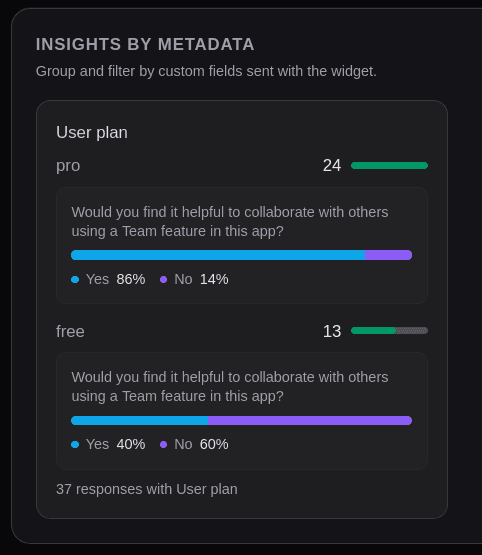
Pass metadata like plan, role, app version, or experiment variant with each submission, then filter feedback by segment to find the signals that matter.
From setup to first insight
Go from account creation to segmented responses in a few simple steps, with optional metadata for deeper analysis.
Sign up
Create your account and head to the dashboard to connect your first site.
Create a website
Add your website and domain to generate a unique widget key and ready-to-paste embed snippet.
Embed the script
Paste the script tag into your page before </body>. Add data-metadata if you want every response to include extra context.
<script
  src="https://zebrafeedback.com/widget.js"
  data-widget-key="YOUR_WIDGET_KEY"
  data-metadata='{"appVersion":"1.0.0","plan":"pro"}'
  async
></script>
You can skip data-metadata and set it later with ZebraFeedback.setMetadata(), for example after a user signs in.
Create a survey with a rule
Add your questions, then choose where the survey appears, such as pages whose URL contains `team`.
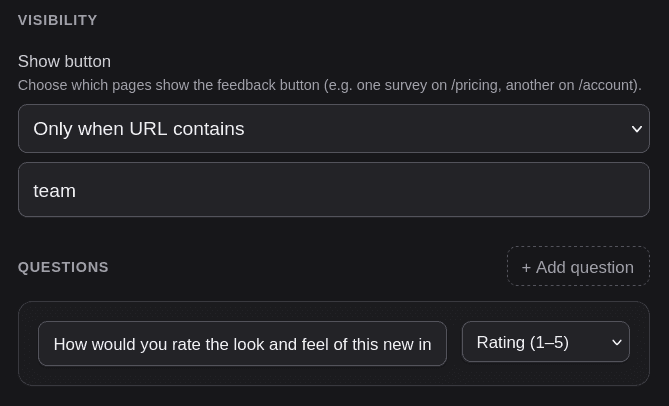
You can run multiple surveys from the same widget by giving each one its own visibility rules.
See responses
Every submission shows up in your dashboard with answers, page URL, and metadata so you can filter responses and understand patterns faster.
Simple pricing
Start free. Upgrade when you need more websites, more responses or no branding.
Free
For trying it on one site
$0 / month
- 1 website
- Up to 5 active surveys
- 100 responses / month
- “Powered by ZebraFeedback” link
Starter
For founders with a few products
$9 / month
- 3 websites
- Up to 20 active surveys
- 1,000 responses / month
- No ZebraFeedback branding
Growth
For small teams and agencies
$19 / month
- 10 websites
- Unlimited active surveys
- 5,000 responses / month
- No ZebraFeedback branding
Everyone starts on Free, no credit card. To move to Starter or Growth, click Upgrade in your dashboard and we'll set it up with you by email.
Frequently asked questions
- Can I try it?
- Yes. The feedback widget is already on this page, look for the Share feedback tab on the right edge. ZebraFeedback uses its own widget on this site so you can try it before signing up.
- Who is ZebraFeedback for?
- Solo founders and indie businesses who want to ask their customers for feedback without setting up a heavy tool. If you can add a script tag to your website, you can use ZebraFeedback.
- What is ZebraFeedback?
- ZebraFeedback is a lightweight website feedback and survey widget. You add one script to your site, create surveys in the dashboard, and set rules for where each survey appears (e.g. specific pages, after time on page).
- How do I add the feedback widget to my website?
- Sign up, add your website and domain, then paste the generated script tag before the closing body tag. The widget loads automatically. See the widget documentation for script attributes and the JavaScript API.
- Can I show different surveys on different pages?
- Yes. Each survey has show-button rules: show everywhere, on pages whose URL contains or equals a path, after a set time on page, or when metadata matches (e.g. 'userPlan' equals 'pro'). One widget can serve multiple surveys; the first matching survey is shown when the visitor clicks the feedback button.
- Is ZebraFeedback free?
- Yes. The Free plan includes one website, up to 5 active surveys and 100 responses a month, with no credit card. Starter ($9/month) and Growth ($19/month) add more websites, surveys and responses, and remove the ZebraFeedback branding.
- Does it work on SPAs and client-side routing?
- Yes. The widget listens for hash changes, popstate, and common History API navigation so your paths stay in sync for targeting, and time-on-page counters reset when visitors move inside your app.
Find out what your customers think
Free for one website. Add the widget and ask your first question in minutes.
Create your free widget